Server Components
Thanks to cooperation of Vercel and React team, we can use Server Components in Next.js. But what are they?
What are Server Components?
- By default all components in Next.js 14 are treated as Server Components.
- If we want to opt-out from this behavior we need to use
"use client"in the beginning of the file. - Server Components are rendered on the server and then sent to the client.
- This means that operations like data fetching or database queries are done on the server side.
- After the component is rendered on the server, it is sent to the client as a static HTML.
Implementation
src/app/api/fetchData.js
// We're simulating fetching data from an API
import { NextResponse } from "next/server";

export async function fetchData() {
  return NextResponse.json([
    { id: 1, name: "Item 1" },
    { id: 2, name: "Item 2" },
    { id: 3, name: "Item 3" },
  ]);
}
src/components/ServerComponentWithData.jsx
import { fetchData } from "../app/api/fetchData";

export default async function ServerComponentWithData() {
  const response = await fetchData();
  const data = await response.json();

  return (
    <div>
      <h1 className="text-3xl">ServerComponentWithData</h1>
      {(data || []).map((item) => (
        <div key={item.id}>{item.name}</div>
      ))}
    </div>
  );
}
src/app/page.js
import ServerComponentWithData from "../components/ServerComponentWithData";

export default function Home() {
  return (
    <main className="flex min-h-screen flex-col items-center justify-between p-24">
      <ServerComponentWithData />
    </main>
  );
}
Results
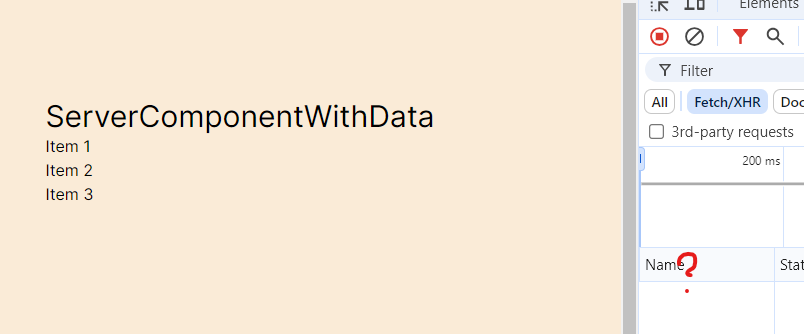
No XHR requests are made on the client side. All data is fetched on the server and sent to the client as a static HTML.
tip
You can even access Database with Server Components! 🚀
import { PrismaClient } from "@prisma/client";

export default async function ServerComponentWithDatabase() {
  const prisma = new PrismaClient();
  const data = await prisma.user.findMany();

  return (
    <div>
      <h1 className="text-3xl">ServerComponentWithDatabase</h1>
      {(data || []).map((item) => (
        <div key={item.id}>{item.name}</div>
      ))}
    </div>
  );
}
Interactivity
If you try to implement interactive hook like useState in Server Components, you will get an error.
import { fetchData } from "../app/api/fetchData";
import React, {useState} from 'react';

export default async function ServerComponentWithData() {
  const [count, setCount] = useState(0);
  const response = await fetchData();
  const data = await response.json();

  return (
    <div>
      <h1 className="text-3xl">ServerComponentWithData</h1>
      {(data || []).map((item) => (
        <div key={item.id}>{item.name}</div>
      ))}
      <button onClick={() => setCount(count + 1)}>Increment</button>
      <div>Count: {count}</div>
      <button onClick={() => setCount(count - 1)}>Decrement</button>
    </div>
  );
}
 ⚠ Fast Refresh had to perform a full reload due to a runtime error.
 ⨯ ./src/components/ServerComponentWithData.jsx
Error:
  × You're importing a component that needs useState. It only works in a Client Component but none of its parents are marked with "use client", so they're Server Components by default.
  │ Learn more: https://nextjs.org/docs/getting-started/react-essentials
  │
  │
   ╭─[/home/seb/Dev/next14-course/examples/next-app/src/components/ServerComponentWithData.jsx:1:1]
 1 │ import { fetchData } from "../app/api/fetchData";
 2 │ import React, {useState} from 'react';
   ·                ────────
 3 │
 4 │ export default async function ServerComponentWithData() {
 5 │   const [count, setCount] = useState(0);
   ╰────