Simple performance test
The task
- Implementation of SSR UI with PHP and Next.js
- Each UI displays a table of combined data from API x100 hits
- The goal is to compare the performance of both solutions
- Test endpoint is
https://datausa.io/api/data?drilldowns=State&measures=Population
Implementation
PHP
<?php
function fetchData($url, $requestNumber = 100) {
    $records = [];

    // Initialize multiple curl handles
    $multiCurl = curl_multi_init();
    $curlHandles = [];

    for ($i = 0; $i < $requestNumber; $i++) {
        $ch = curl_init();
        curl_setopt($ch, CURLOPT_URL, $url);
        curl_setopt($ch, CURLOPT_RETURNTRANSFER, 1);
        curl_multi_add_handle($multiCurl, $ch);
        $curlHandles[] = $ch;
    }

    // Execute the multi handle
    $running = null;
    do {
        curl_multi_exec($multiCurl, $running);
        curl_multi_select($multiCurl);
    } while ($running > 0);

    // Collect the responses
    foreach ($curlHandles as $ch) {
        $response = curl_multi_getcontent($ch);
        $data = json_decode($response, true);
        if (isset($data['data'])) {
            $records = array_merge($records, $data['data']);
        }
        curl_multi_remove_handle($multiCurl, $ch);
    }

    // Close the multi handle
    curl_multi_close($multiCurl);

    return $records;
}

// Set the URL and number of requests
$url = 'https://datausa.io/api/data?drilldowns=State&measures=Population';
$requestNumber = 100;

// Fetch the data
$records = fetchData($url, $requestNumber);
?>
<!DOCTYPE html>
<html lang="en">
<head>
    <meta charset="UTF-8">
    <meta name="viewport" content="width=device-width, initial-scale=1.0">
    <title>Data USA</title>
</head>
<body>
    <main class="flex min-h-screen flex-col items-center justify-between p-24">
        <h1>Data USA</h1>
        <table>
            <thead>
                <tr>
                    <th>#</th>
                    <th>State</th>
                    <th>Year</th>
                    <th>Population</th>
                </tr>
            </thead>
            <tbody>
                <?php foreach ($records as $index => $record): ?>
                    <tr>
                        <td><?php echo $index + 1; ?></td>
                        <td><?php echo htmlspecialchars($record['State']); ?></td>
                        <td><?php echo htmlspecialchars($record['Year']); ?></td>
                        <td><?php echo htmlspecialchars($record['Population']); ?></td>
                    </tr>
                <?php endforeach; ?>
            </tbody>
        </table>
    </main>
</body>
</html>
php -S localhost:8000
Next.js
import React from "react";

export default async function Home() {
  const url = 'https://datausa.io/api/data?drilldowns=State&measures=Population';
  const requestNumber = 100;

  let records: { State: string, Year: number, Population: number }[] = [];

  for (let i = 0; i < requestNumber; i++) {
    const response = await fetch(url, {cache: "no-store"});
    const data = await response.json();

    records = [...records, ...data?.data];
  }

  return (
    <main className="flex min-h-screen flex-col items-center justify-between p-24">
    <h1>USA Data</h1>
      <table>
          <thead>
            <tr>
                <th>#</th>
                <th>State</th>
                <th>Year</th>
                <th>Population</th>
            </tr>
          </thead>
          <tbody>
            { records.map(({ State, Year, Population }
              : { State: string, Year: number, Population: number }, index: number) => (
                <tr key={index}>
                    <td>{ index + 1 }</td>
                    <td>{ State }</td>
                    <td>{ Year }</td>
                    <td>{ Population }</td>
                </tr>
            )) }
          </tbody>
      </table>
    </main>
  );
}
pnpm build && pnpm start
Results
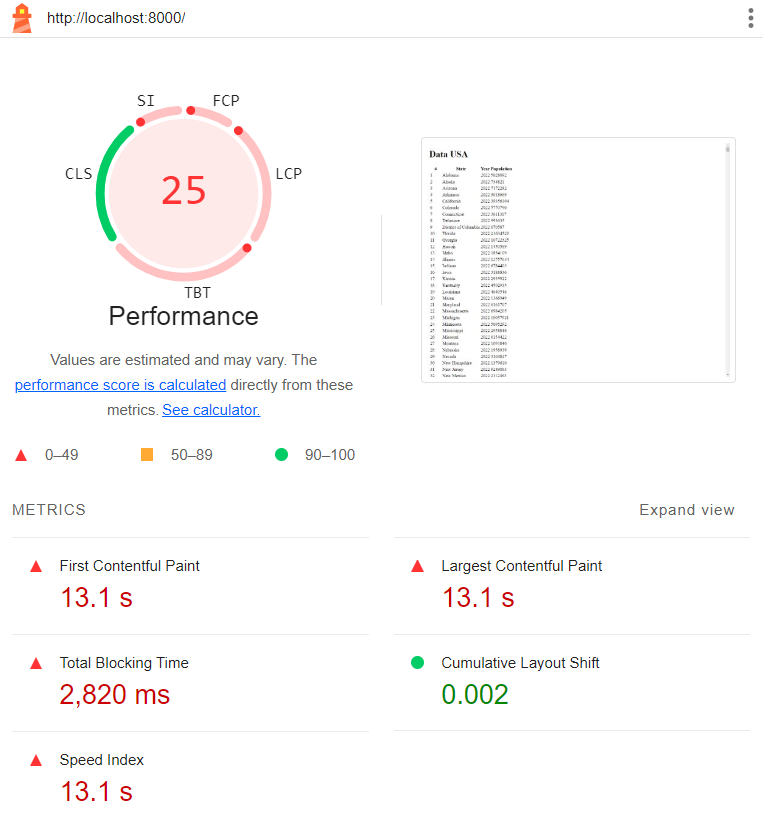
PHP

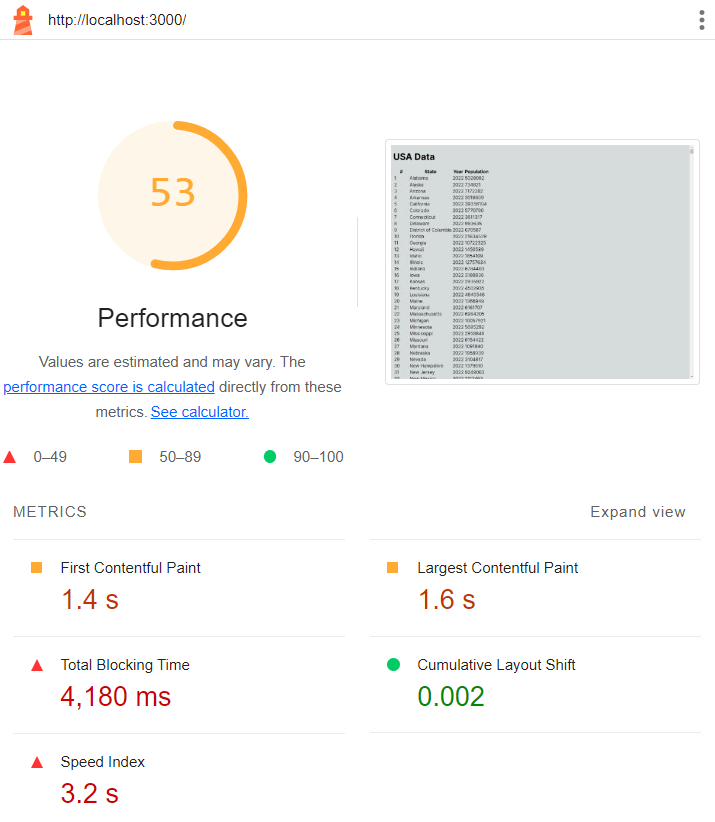
Next.js

Conclusion
Loading times are comparable.
Despite the fact that the PHP solution is faster in terms of blocking time, the Next.js solution is more efficient in providing a visible content earlier.
Next.js has overall better performance scores as well.
info
This test is very simple and to give a final verdict we weould need to perform more complex tests and compare the results.